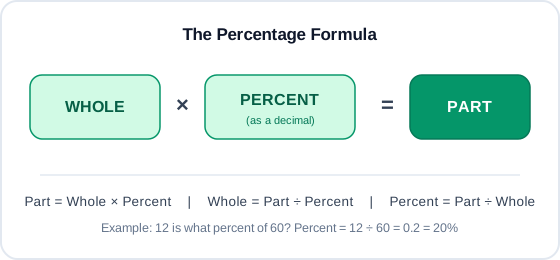
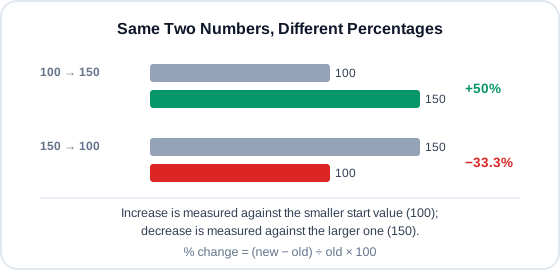
Whether you're splitting a restaurant bill, checking a discount at checkout, or working through a homework problem, a percentage calculator turns a fraction-of-100 question into the exact number you need in one step. Instead of doing the arithmetic by hand, you plug in the two values you already know and find percentage answers instantly — accurate, without pulling out a pen and paper. This guide walks through the underlying formula, why percentage change and percentage difference aren't interchangeable, and how those same numbers turn into real discounts, margins, and grades. For more number-crunching tools, try math calculators at Joteo.
What Is a Percentage Calculator?
A percentage calculator works by treating three numbers as interchangeable — a part, a whole, and a percent. Give it any two, and it solves for the third using the same short chain of division and multiplication you'd use by hand. A percentage itself is just a ratio written as a fraction of 100; the word literally means per hundred. Every fraction splits into a numerator (the part) and a denominator (the whole) — a percentage is simply that same fraction rescaled so the denominator is always 100. If 25 out of 100 people vote yes, that's 25% — a quarter of the whole, a percentage of a whole in the most literal sense. You'll usually see it written with a percent sign (%), though "percent" and "pct" work as shorthand too. Whether you calculate percentages for a grade, a tip, or a stock report, the underlying mechanics never change.
What Is a Percentage?
Percentages let you compare things that don't share a common scale — 12 out of 60 and 40 out of 200 both reduce to the same 20%, even though the raw numbers look nothing alike. That's the entire value of expressing a number as percentage-based calculations rather than a raw fraction: it puts every comparison on the same 100-point scale, whether you're comparing exam scores, discounts, or survey results.